
A replatform looks like a project until it stops being one. The launch date passes, the team feels the relief of getting the new site live, and then organic traffic drops 30% overnight. Some brands lose six figures in revenue inside the first month, others take a full quarter to recover, and then there are those who never quite get back to where they were.
Marketing leaders own the number that drops. They’re the ones explaining to leadership why revenue fell off right after the migration the team signed off on. They get asked what happened, what’s being done, when it’ll be back. None of those answers are easy to give from inside the recovery.
The brands that come out of a replatform with traffic and revenue intact, or growing, made different choices before launch. This isn’t about better technology or bigger budgets either. It’s different decisions about what to validate, when to monitor, and who owned the revenue number through the transition.
Here’s what we’ll address: where revenue actually leaks during a replatform, what the migrations that hold up get right, the questions worth asking before you sign off, and how Bighorn approaches the work so the new site lands clean.
Where the Revenue Actually Leaks
Revenue loss during a replatform rarely shows up in one big crash. It leaks from five places at once, most of them invisible until weeks after launch.
- SEO and traffic loss. This is the loudest one and the fastest to show up in the data. Missed redirects, broken internal links, and lost authority on key pages can take down 30% of organic traffic overnight, with 7- and 8-figure DTC brands seeing it happen to them on launch day (Ecommerce Fastlane). Recovery takes months because Google reindexes on its own timeline.
- Checkout integration breaks. Replatforming is the highest-risk moment for ecommerce revenue, and checkout is where the damage compounds (Noibu). Payment gateways, tax calculations, shipping logic, promo and discount engines, all need to behave the same way on the new platform that they did on the old one. When something behaves slightly differently, the revenue loss runs in real time and the team rarely catches it on day one.
- Performance regressions. A 0.2 second shift in page load can drop Core Web Vitals from Good to Needs Improvement, and that pulls SEO and conversion down with it (Noibu). New platforms often ship with different baseline performance than the old one, and the gap compounds across the funnel.
- Third-party tag failures. Analytics, pixels, attribution tags, and tracking scripts break silently when the migration happens. Conversions still happen, the site still works, but the data the team is using to monitor the launch is wrong. The damage hides for weeks because the dashboards show numbers the team trusts.
- Data integrity issues. Customer records, order history, product data, loyalty status, and saved payment methods get corrupted or lost when migration testing isn’t rigorous. Returning customers hit walls. New customers complete checkout against records that don’t reconcile to the back office. The cleanup runs for months.
Each one of these alone can dent a quarter. Together, they’re how a replatform turns into a year of recovery work.
What the Migrations That Hold Up Get Right
Migrations that finish revenue-positive share a few habits. None of them are flashy. All of them happen before the new site ever sees production traffic.
- They validate operational workflows, not just the website. A site can look great and still fail if the business processes behind it break. The replatforms that hold up test the work that happens after the order gets placed: inventory synchronization with the ERP and warehouse systems, pricing updates flowing correctly across catalogs, promotions firing the right discounts at checkout, shipping calculations matching what the customer was quoted, and order data routing cleanly into the back office.
- They identify customizations that should be retired. Not every legacy feature deserves a place on the new platform. The replatforms that hold up take the migration as a chance to simplify, retiring code paths that exist because of a workaround from years ago that nobody remembers. The migrations that break are the ones that recreate years of technical debt on a new platform and call it progress.
- They establish clear success metrics before launch. Migration success gets measured against numbers that were baselined before any code shipped. Revenue, conversion rate, AOV, organic traffic, and the operational efficiency metrics that the back office runs on. Teams that skip the baseline declare victory because the site launched, instead of because the business improved.
- They map and test every URL and redirect in staging. Every old URL points somewhere on the new site, ideally to the page that maps closest to what was there before. Internal links get updated, sitemaps get regenerated, and the redirect chain gets tested end to end before traffic ever touches it.
- They monitor obsessively for the first 60 to 90 days. Most of the damage during a replatform is silent. Bad redirects don’t throw errors. Performance regressions don’t break anything. Tag failures don’t show up in QA. The teams that catch problems fast are the ones running daily checks on traffic, conversion, and revenue against the pre-launch baseline, with the bandwidth to fix what slips while it still matters.
The work that protects revenue happens before anyone clicks the new site, and the teams that skip it spend the next quarter explaining or figuring out what went wrong.
The Questions Worth Asking Before You Sign Off
A replatform proposal will sound confident no matter who’s running it. Plans look organized on slide decks, timelines look reasonable on Gantt charts, and the team running the project will tell you everything will be fine. The work for a marketing leader is figuring out whether the confidence is earned.
Confidence on paper is easy. What separates a team that has run this work before from one that’s improvising is the specificity of their answers when pressed on the things that go wrong.
The questions below come from watching replatforms succeed and fail across dozens of brands. None of them are technical. All of them are answerable by anyone who’s actually responsible for the outcome.
- How will critical business processes be tested before launch? Inventory, pricing, promotions, tax, shipping, and order processing all have to work the same way on the new platform that they did on the old one. The team should walk you through how each gets validated in staging, with named test cases and named owners. “We’ll test it” isn’t an answer.
- What integrations represent the highest business risk, and how are they being validated? ERP, PIM, OMS, CRM, and marketing platform connections are where revenue actually breaks. Each carries different consequences when it fails.
- What is the rollback plan if something goes wrong? Every migration plan should have one, and the team should describe it without scrambling (E.g., what triggers a rollback, who makes the call, how fast it can happen, and what state the data ends up in).
- How much of the solution relies on custom code versus platform capabilities? Custom code is fine where it’s earning its keep. The more of the build that depends on bespoke development, the harder the platform is to maintain, scale, and hand off as the team changes.
- What does success look like 90 days after launch? “The site is live” doesn’t count. Success at 90 days should be defined by revenue, conversion, traffic, and operational metrics measured against the pre-launch baseline. If the team can’t articulate what those numbers should look like, they haven’t planned for revenue protection. Instead, they’ve planned for a launch date.
The pattern across all five questions is the same. Specificity tells you the team has worked through what could go wrong, while generalities tell you they’re hoping it won’t. The fifteen minutes it takes to ask these questions in a kickoff meeting will surface the gap before any code gets written, which is a far cheaper place to find it than two quarters into a recovery.
How Bighorn Approaches Replatforming
The work that protects revenue during a replatform happens in three phases, with most of it loaded into the time before the new site sees a single visitor. The phases below are how Bighorn structures every migration, and the order matters because the choices made in phase one decide what’s even possible in phase three.
- Pre-migration. Before any code gets written, the team baselines what’s currently working: traffic by page, conversion by template, revenue by channel, and the operational metrics the back office runs on. Every URL gets mapped to its new home, every integration gets audited for what it does and what could break, and every customization on the old platform gets reviewed for whether it’s worth bringing forward or worth retiring. The redirect plan gets built and tested in staging before anything goes live. Decisions about what to migrate, what to rebuild, and what to leave behind happen here, with the full picture of what each choice costs to maintain over time.
- During migration. Staging environments mirror production closely enough that what works in testing actually works on launch day. Every integration gets validated against real data, every checkout path runs end-to-end, every payment flow gets exercised with live test transactions, and every operational workflow gets pressure-tested before traffic ever touches the new site. Where it makes sense, the rollout phases so the team can catch problems on a small percentage of traffic before exposing the whole site, with a rollback plan ready to execute if something material breaks.
- Post-launch. The first 60 to 90 days are where most of the silent damage shows up, and they’re also where most teams have already moved on to the next project. Daily checks run on traffic, conversion, and revenue against the pre-launch baseline, with alerts set for the kinds of regressions that don’t throw errors but quietly cost money. Fast fixes happen on the things that slip, and the optimization work that lifts revenue from neutral to positive starts as soon as the site is stable.
What makes this work isn’t a tool or a process diagram. It’s that the same senior team owns the migration from baselining through 90 days post-launch, with accountability tied to the revenue and traffic numbers we agreed to protect before the project started.
What This Looks Like in Practice
The brands that have run replatforms with Bighorn end up with measurable lifts in the metrics that matter to marketing leaders. Five examples below, each one a different kind of migration with a different kind of result.
- Levin Furniture. Multi-brand Shopify Plus migration with custom PIM and middleware integration to STORIS, the ERP running their operations. Product data, inventory, custom shipping rates, protection plans, and regional pricing all sync dynamically between the storefront and the back office. Post-migration, total sales are up 83% and conversion rate is up 17%. The migration set them up for growth, not recovery.
- Victrola. Redesign paired with ongoing CRO work on a Shopify Plus site. Year over year, conversion is up 33%, AOV is up 37%, and total sales are up 52%. A single PDP A/B test on the add-to-cart flow lifted conversions another 11%. The numbers compound because the foundation under them holds up.
- Swoon. Optimization work post-launch on the brand’s product pages and checkout flow. A PLP test lifted PDP page views by 2.63%. A test that hid pricing until checkout drove a 632% lift in checkout starts, and add-to-cart climbed 617% on the same test. Some experiments only work when the underlying site can support them.
- RDQ. Redesign paired with ongoing optimization work. AOV is up 20% and total sales are up 5%. The kind of steady, compounding gain that shows up when the foundation is sound and the team has the room to keep testing.
- Seldens. STORIS ERP integration to Shopify, automating order processing, inventory management, and product data sync. The manual work that used to consume hours of team capacity every week now happens on its own, which gives the operations team time to focus on the work that actually moves the business forward.
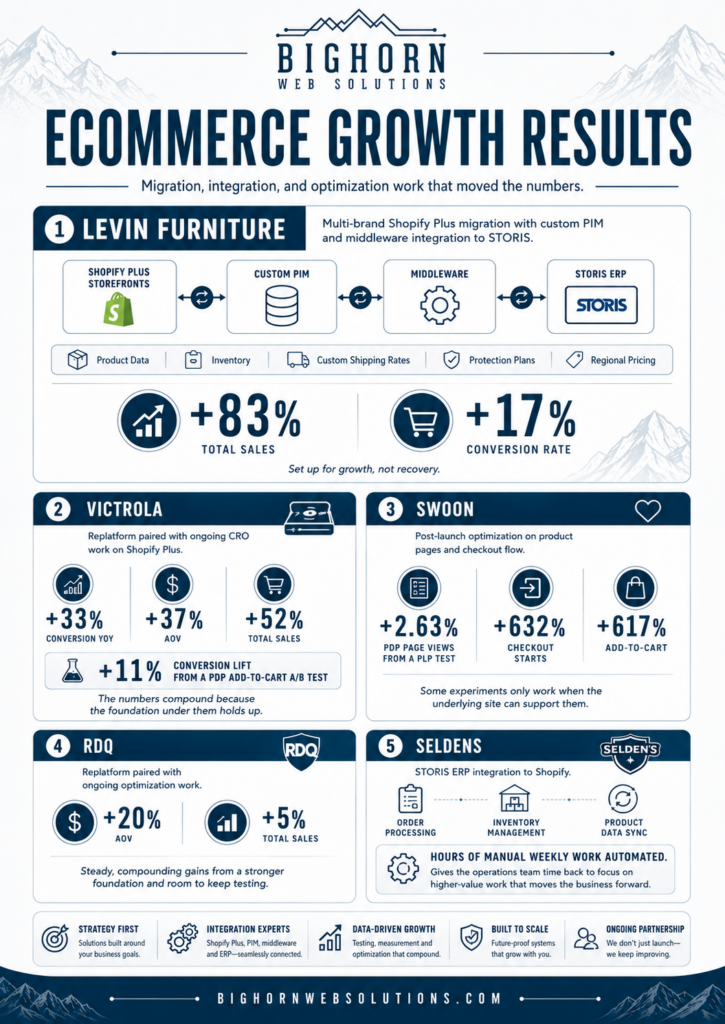
The migrations and optimization work that followed delivered measurable revenue and conversion lifts because the foundation was built to support them.
Where to Start
Migrations that finish clean treat the work as a revenue event from day one, validate the operations behind the site as carefully as the site itself, and monitor obsessively in the weeks after launch.
If you’re scoping a replatform and want a second set of eyes on the risk before you sign off, we run a 20-minute feedback session that pressure-tests where revenue could leak during your migration. Book a 20-min feedback session.